

If you’ve written code for an AVR, Atmel’s family of 8-bit microcontrollers used in many Arduino boards, you’ve almost certainly encountered a program called avrdude, whether you realized it or not.
avrdude, which stands for AVR Downloader/Uploader, is a command-line utility that communicates directly with AVR microcontrollers at a level below any running firmware. It does this by communicating with the built-in programming interfaces of AVR devices, putting the chip into a state where new code can be uploaded.
As AVR devices evolved, their programming methods changed with them. Across the AVR family, avrdude provides a single, consistent way to communicate with devices that use very different programming interfaces
ISP (In-System Programming)
Used by classic ATmega and ATtiny devices. A small set of pins, typically MOSI, MISO, SCK, and RESET, is used to assert reset, clock commands in, and read responses back.High-voltage programming
Supported by classic ATmega and ATtiny devices as a recovery mechanism. These modes use a 12-volt signal to force the chip into programming mode when standard ISP access is disabled or misconfigured.PDI and UPDI
Used by newer AVR families. XMEGA devices use PDI, while more recent parts use UPDI, a single-wire interface that combines programming and debug access.
Even as device programming interfaces changed, avrdude continued to provide a common way to communicate with them.
Before the Dude
Atmel showed up in the early 1990s as a semiconductor company best known for nonvolatile memory, EEPROM and flash. They weren’t a microcontroller company at first. They had tried a few things in that direction, but nothing really caught on. What they did know cold was flash memory, and how to make parts that were simple, inexpensive, and easy to drop into real hardware.
The AVR architecture came along right when Atmel was looking for something that could actually make use of those strengths. Over in Norway, engineers Alf-Egil Bogen and Vegard Wollan had put together a clean 8-bit RISC design that ran fast and made efficient use of program memory. Atmel licensed the design, brought the guys on board, and wrapped that core around their flash technology. That’s how AVR became a self-programmable microcontroller family instead of just another CPU on a datasheet.
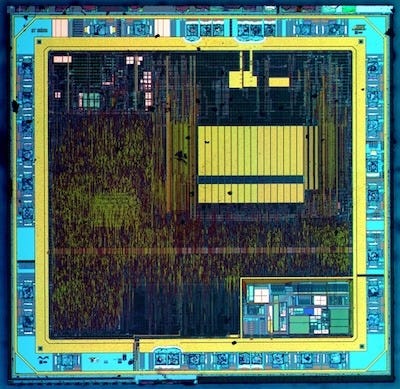
AVRs were built to be programmed in-system from day one using simple, well-defined protocols, long before platforms like Arduino existed. Firmware was usually written by the same engineers who designed the hardware, often with no operating system underneath it. Your code didn’t run on top of an OS, it was the system.
Programming interfaces like ISP, fuse settings, and startup behavior were all part of the system design, which meant developers needed tools that could work directly at that level.
The Dude Arrives
avrdude didn’t show up as part of an IDE or an official toolchain. It showed up out of necessity. Firmware developers needed a reliable way to talk directly to AVR chips and download code into them.
What existed at the time was a specification. Atmel published application notes like AVR910 that spelled out the in-system programming protocol in exact detail. The commands, timing, and electrical requirements were all there.
What didn’t exist was a consistent, reusable tool that actually implemented it the same way every time. That changed in the late 1990s, when Brian S. Dean wrote the original avrdude under the name AVRPROG. It was a simple command-line programmer that implemented the AVR in-system programming protocol so developers could load firmware and configure basic device parameters directly from Unix-like systems.
As the tool spread beyond its original Unix environment, the name was changed to avrdude to avoid confusion with Atmel’s own AVRPROG.EXE utility on Windows.
In the years that followed, avrdude became a community-managed project hosted on Savannah, a public CVS repository that was part of the GNU ecosystem long before GitHub existed. This repository served as the central hub for patches, platform ports, and expanding device support.
Developers like Ted Roth, Eric Weddington, and Jörg Wunsch helped port avrdude to additional platforms (Linux, macOS, Windows) and expanded support for new devices and programmers.
Today, avrdude is an actively maintained, cross-platform, open-source tool, with its development hosted on GitHub.
avrdude in the Age of Arduino
Most developers encounter avrdude indirectly. Platforms like Arduino popularized integrated development environments for microcontrollers, but under the fancy veil, they still relied on avrdude whenever code needed loading, fuses had to be set, a device identified, or a misconfigured chip recovered.
Arduino originated in 2005 at the Interaction Design Institute Ivrea (IDII), a two-year graduate program in interaction design in northern Italy. It was created as an affordable, open-source microcontroller platform for students, designers, and artists to prototype interactive projects easily, without deep engineering expertise. The early boards used the ATmega8 microcontroller and sold for around $20 to $30.
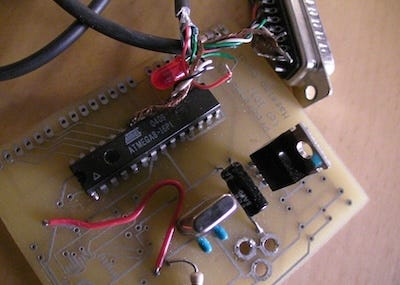
The platform also included a beginner-friendly IDE for creating and uploading code sketches, helping it spread quickly through word-of-mouth in maker, education, and creative communities. And all through that, avrdude was still there under the hood of that IDE doing its stuff.
What Arduino did change was to massively expand the audience. Suddenly there were a whole new set of people showing up, making, tweaking, and learning from examples and libraries instead of digging through datasheets. AVR development was no longer just for the embedded engineers; it was for anyone who wanted to get their hands dirty.
But even with a whole new class of customers, Atmel didn’t sit back. They kept cranking out new chips to handle tougher jobs, with more peripherals, tighter integration, fewer pins, and all the extra features developers started asking for.
Some of these chips needed more robust programming methods to handle the advanced features. Others added ways to recover misconfigured devices or to support single-wire debugging.
Through all these changes, avrdude’s role remained the same. As new AVR chips added features and programming methods — from classic ISP and high-voltage programming to PDI and UPDI — avrdude grew to support them all, providing a consistent bridge between developer and silicon. It implemented the protocols the hardware expected, handled timing and state, and reported exactly how the device responded, even as layers and IDEs changed.
How Does the Dude Do It?
But avrdude is just a piece of software. It can follow the protocol and read what the chip spits back, but it can’t physically flip pins or bang the clock lines on the board. For that you need hardware, a programmer device to actually drive the signals. Fortunately there are number of programmer tools are available, ranging from simple hobbyist adapters to full-featured professional devices.
Atmel-ICE – The top-tier AVR programmer and debugger. Supports ISP, PDI, UPDI, and high-voltage programming. I personally use the basic kit, which includes the programmer and USB cable and handles most standard ISP work, while the full kit adds adapters and cables for connecting to a variety of AVR boards and interfaces. These are the gold standard for development, testing, and rescuing misconfigured chips.
SparkFun AVR Programmers – Hobbyist-friendly USB-to-ISP programmers that work well with avrdude. The Pocket AVR Programmer is a general-purpose ISP programmer for classic AVRs with 64K flash or less. The Tiny AVR Programmer is really designed for tinyAVRs but should also work with other classic AVRs via ISP headers. Both are low-cost, reliable alternatives for most tasks, though they don’t support larger AVRs like the ATmega2560 on an Arduino Mega.
Olimex – Community-friendly AVR programmers that work well with avrdude and open-source toolchains. They offer a few models that include classic ISP and PDI interfaces, using standard USB (Type B) or serial connectors to connect to target boards. Based in Bulgaria, their goal has always been to provide reliable, low-cost programming hardware accessible to hobbyists and small teams.
USBasp – Cheap, often cloned USB-to-ISP programmers that work with avrdude for classic AVRs. They are known for timing or clock issues, so you get what you pay for, and they’re not recommended for serious work.
Arduino as ISP – In a pinch, you can even turn an Arduino into a DIY AVR programmer. Official documentation and the ArduinoISP sketch on GitHub show how to connect the SPI pins and RESET to another AVR board so it can be programmed via avrdude. It works for basic projects but isn’t as robust or reliable as a dedicated hardware programmer.
AVR programmers and target boards come with two common ISP connector formats: a 6‑pin and a 10‑pin layout. Event though the pinout is different, they both carry the same signals.
RST – asserted to put the MCU into programming mode
MOSI – data sent from the programmer to the MCU
MISO – data sent from the MCU back to the programmer
SCK – clock line for synchronizing data
VCC – power supplied to the target MCU
GND – common ground between programmer and target
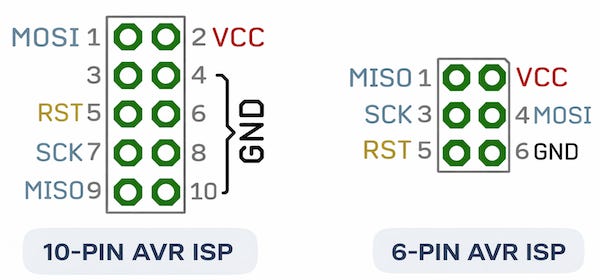
Note: Both the 6‑pin and 10‑pin AVR ISP connectors use a standard 0.1 in (2.54 mm) pitch. Friggen KiCad had the footprints completely wrong. I got burned using a 2 mm header that refused to fit a standard ribbon cable. Always double-check the footprint against the datasheet before spinning up a board.
A good programmer isolates and buffers the signals, provides clean timing on RESET, MOSI, MISO, and SCK, and monitors the target’s VCC to safely handle 5 V or 3.3 V boards. Cheap programmers often drive the signals directly, may have poor timing, and usually don’t sense the target voltage. This can cause glitches, unreliable programming, or even damage the MCU.
One thing to keep in mind is that no matter the ISP programmer model, you should never hot-plug it into a powered MCU board. Back-feeding signals through the MCU pins can fry the chip. I toasted three before figuring it out.
The Dude is also a Detective
avrdude can do more than just flash firmware and set fuses. By analyzing how the chip responds, it generates error messages that provide valuable clues about what is happening with the hardware. Every “command failed” or “device not responding” message tells a story, whether the MCU is powered, the clock is running, the reset line is behaving, or something else is wrong.
Getting hardware insight with avrdude
You can query a connected AVR and see its voltage, memory layout, fuses, and other low-level info with a single command. For example, using an Atmel-ICE programmer on an ATmega88:
avrdude -c atmelice_isp -p m88pb -v -qThis command tells avrdude to use the Atmel-ICE in ISP mode (-c atmelice_isp), target an ATmega88PB (-p m88pb), print verbose output (-v), and quiet any progress messages (-q). Every detail you see here can give you insight into the board’s power, wiring, and chip health.
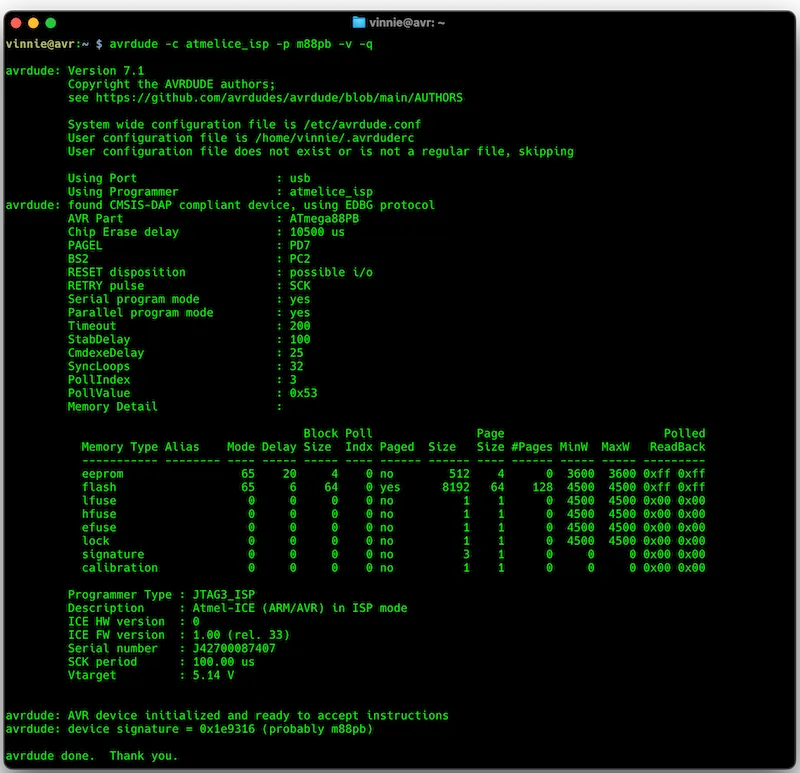
Looking at the screenshot, you can see how much information avrdude exposes. For example,
Vtarget – the actual logic voltage applied to the MCU. This single number carries a lot of meaning. If your ISP is miswired or plugged in backward, voltage can flow the wrong way through I/O pins or protection diodes, which can prevent communication or even damage the chip. Checking Vtarget lets you catch these problems immediately, before you attempt any programming, saving parts and avoiding troubleshooting headaches.
Device signature – a three‑byte value programmed into every AVR that uniquely identifies the part. Reading it with avrdude confirms that the MCU is powered, wired correctly, and responding over the programming interface. A correct signature tells you the right chip is in place, while a mismatch or failure to read the signature points to wiring issues, misconfigured fuses, or even a dead part. This makes the device signature the first real clue in diagnosing hardware problems before you touch firmware. You can find a complete list of all known AVR signatures in the avrdude sources.
Memory details – shows the sizes of flash, EEPROM, and fuse memory, along with paging and read/write characteristics. This helps confirm that the chip matches what you expect, that your code will fit, and gives a clear view of the device’s memory layout before programming.
Fuse values – hfuse, lfuse, efuse, lock bits. We’ll cover these in detail a bit later.
Timeouts, delays, and poll loops – these internal settings show how avrdude is communicating with the MCU. Unusual values or repeated timeouts can hint at signal integrity problems, wiring issues, or timing mismatches between the programmer and the target.
Other subtle diagnostics – The verbose avrdude output exposes low-level programmer behavior that is critical for debugging:
Chip erase delays – reveal whether the programmer and MCU are aligned in timing.
RESET disposition – shows how the programmer asserts the RESET line; misconfigured reset can block programming entirely.
SPI timing parameters – Retry Pulse, StabDelay, CmdExeDelay highlight missed pulses or unstable clocks.
Synchronization counts – SyncLoops, PollIndex, PollValue indicate wiring issues, weak signals, or a missing clock.
SCK period – the actual SPI clock; ensures timing is safe for the target’s voltage and speed.
Programmer serial number and firmware version – helps diagnose hardware quirks or outdated firmware that might affect reliability.
Maybe It’s a Blown Fuse
Fuse settings are one of those things most people gloss over in tutorials about AVRs and Arduino. They’re low-level configuration bits that control critical behavior: startup sequence, clock source, reset functionality, and brown-out detection. Screw up the fuses, and a perfectly good chip can appear dead or just go haywire.
There are fuse bytes on most AVRs that control low-level configuration of the microcontroller:
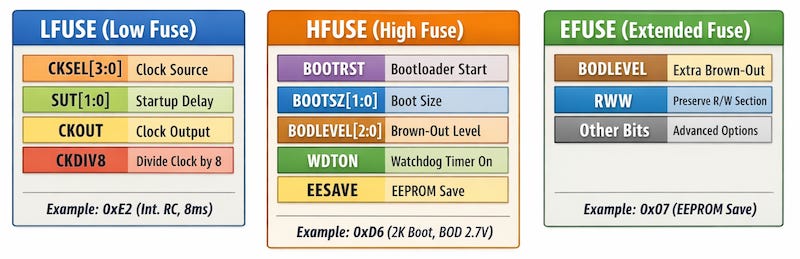
These three main bytes—LFUSE, HFUSE, and EFUSE—determine how the MCU powers up, which clock it uses, how it handles resets, and how it protects critical memory sections before any firmware even runs. Together, they ensure the chip operates safely and predictably. Understanding them is essential for diagnosing hardware issues, verifying proper startup behavior, and safely recovering chips that appear unresponsive.
One good resource is the Microchip AVR Fuse Overview, which explains each fuse bit and its effect on device behavior. Another is the Eleccelerator AVR Fuse Calculator, an interactive tool to experiment with fuse settings and see exactly what each bit does.
Either way, it is always prudent to refer to the datasheet for the specific AVR chip you’re working with.
When the Dude Got Nothing
Even with a solid programmer and the correct command syntax, sometimes avrdude just can’t get a response. When the Dude gets nothing, those error messages are gold. They reveal exactly what’s going wrong at the hardware level:
stk500_recv(): Programmer not responding
Usually a wiring problem: missing connections, miswired RESET, or a dead chip. Double-check board selection and connections. Could also indicate a disconnected or faulty programmer.program enable: target does not answer
The MCU didn’t enter programming mode. Check RESET, clock source, power supply, and fuse settings. Could also indicate that the chip is misconfigured or bricked.Invalid device signature
Wrong chip selected in avrdude, weak signals, or miswiring. Could also indicate a faulty or partially dead MCU.verification error, first mismatch at byte 0x00
Flash didn’t program correctly. Often caused by poor SPI connection, signal integrity issues, or timing errors. Could also point to an underpowered or noisy target board.timeout while waiting for response
Signals aren’t reaching the chip, timing mismatches, missing pull-ups, wrong oscillator, or programmer speed too high. Could also indicate that the MCU isn’t powered or RESET is stuck.fuse write failed / fuse read failed
Electrical problem or timing violation. Could indicate undervoltage, miswiring, or misconfigured fuses. May also occur if programmer speed is too fast for the target.cannot set sck period / stk500_getsync() attempt N of M: not in sync
Programmer cannot communicate reliably. Usually wiring errors, programmer misconfiguration, or incorrect clock source. Could also indicate a partially bricked MCU.avrdude: Device signature = 0x000000
No response at all. Check power, clock, and RESET. Chip could be physically damaged, dead, or completely unresponsive.avrdude: error reading EEPROM
Communication failure during EEPROM read. Might be wiring, programmer fault, or partially dead chip.target does not answer, HVSP/HVPP mode required
Normal for chips with disabled RESET or misconfigured clocks. High-voltage programming may be required to recover the chip.avrdude: unknown programmer id
Programmer type not specified correctly, firmware mismatch, or incompatible programmer.signature mismatch: expected 0x1E950F, found 0x000000
Chip not responding or incorrectly connected. Indicates a fundamental hardware-level issue rather than a software problem. Could be bad wiring, dead MCU, or misconfigured fuses.
Reading these messages carefully usually lets you identify a dead chip, wiring issues, programmer setup problems, or power/clock faults, long before you suspect your firmware.
Time to Break Out the Scope
Not every avrdude failure means the MCU is dead. Before assuming the worst and risking another chip, it pays to figure out what’s actually happening. Problems can stem from wiring, clock issues, power glitches, or programmer misconfiguration. The solution: break out the scope and watch the signals as avrdude tries to communicate with the chip.
Before assuming the chip is dead, start with the basics. Probe the signals right at the MCU pins. A bad solder joint or broken trace can make everything look fine elsewhere on the board, while the chip itself never sees the signals. Measuring at the MCU ensures you’re checking the real hardware, not just the board wiring.
Check VCC and GND – Ensure the target board is powered, and the programmer’s ground is connected. A missing or low supply can prevent communication and even damage the chip.
Check RESET – The programmer uses the RESET line to put the MCU into programming mode. On the scope, you should see the line pulled low briefly when avrdude starts communication. If RESET stays high, fluctuates, or never toggles, the chip won’t enter programming mode. Causes can include wiring mistakes, a missing pull-up resistor, or a misconfigured fuse that disables external reset. Watching this signal confirms whether the programmer can actually assert reset correctly before you assume the MCU is dead.
SCK (clock) – You should see a clean, regular square wave whenever avrdude is clocking data into the MCU. No activity or irregular edges mean the programmer isn’t driving the clock properly, or the line is disconnected.
MOSI (Master Out, Slave In) – Data sent from the programmer to the MCU should change only on the clock edges. You should see distinct high and low voltage levels corresponding to the bits being sent. Glitches, floating signals, or missing transitions indicate wiring problems, signal integrity issues, or incorrect programmer speed settings.
Check MISO (Master In, Slave Out) – It’s how the MCU talks back to the programmer. On the scope, it should change state in sync with clocked commands on MOSI. If it is flat, stuck high, low, or silent, it usually indicates the MCU isn’t responding, even if power, RESET, and the clock look correct. Observing MISO gives you the first solid clue that the MCU is capable of communicating before you start suspecting firmware.
Also watch for signal integrity issues. Ringing, slow edges, voltage dips, or spikes can indicate wiring problems, long cables, or missing pull-ups. Observing the signals in real time lets you distinguish a truly dead MCU from one that isn’t responding due to wiring, timing, or power issues. A quick scope check can save hours of troubleshooting and prevent more chips from being damaged by repeated failed programming attempts.
Remember, avrdude is only as capable as the hardware it talks to. If the MCU is physically damaged, missing a crystal, or lacks power, no amount of clever command-line flags will make it respond. That’s why verifying signals directly at the MCU with a scope before blaming firmware is critical.
A Couple More Words on the Dude
Before we close the book on avrdude, here are a few command-line options people often overlook:
-v / -vv / -vvv – Verbose mode. Shows the programmer’s internal timing, memory page delays, and low-level responses from the MCU. Useful for diagnosing subtle wiring, timing, or signal integrity problems that might otherwise go unnoticed.
-B <value> – Programmer bitclock period. Slows down communication for breadboards, slow oscillators, or marginal connections, helping avoid “device not responding” errors.
-U <mem>:<r|w|v>:<file> – Memory operations (read, write, verify). Can be used to inspect flash, EEPROM, or fuses and even recover misconfigured chips using high-voltage programming if standard ISP fails.
High-Voltage Programming (HVPP / HVSP) – Use this when a chip is misconfigured or “bricked,” for example if the RESET line is disabled or the clock source is invalid. High-voltage programming lets avrdude access fuses and flash that aren’t reachable via standard ISP, enabling recovery of the device.
The -c option for high-voltage programming depends on your hardware:
Atmel-ICE: use -c atmelice_hvpp for High-Voltage Parallel Programming or -c atmelice_hvsp for High-Voltage Serial Programming.
Other high-voltage programmers: consult the device documentation, as each may require a different -c identifier.
Example: Recovering an ATmega88PB Using HVPP
avrdude -c atmelice_hvpp -p m88pb -U hfuse:r:-:h -U lfuse:r:-:h -U efuse:r:-:hExplanation:
-c atmelice_hvpp selects the Atmel‑ICE High-Voltage Parallel Programmer.
-p m88pb targets the ATmega88PB.
-U hfuse:r:-:h -U lfuse:r:-:h -U efuse:r:-:h reads the high, low, and extended fuse bytes and prints them in hexadecimal.
Use this command when the MCU is misconfigured or appears bricked due to disabled RESET or invalid clock settings. High-voltage programming allows avrdude to access fuses and flash that aren’t reachable via standard ISP, enabling recovery without replacing the chip.
The Dude Abides
Make no mistake, avrdude isn’t just for flashing chips. It’s a diagnostic microscope, a rescue kit, and your essential sidekick for working with AVR hardware
Even after decades, new chips, IDE churn, and countless hobbyists and engineers, the Dude still rolls. Avrdude stays under the hood, talking to the MCU, reading and writing fuses, and programming the chip reliably. You can still depend on it to get the job done.
The Dude just continues to abide.
If you care about how things are made and why they’re built the way they are, you’ll probably like the rest of what this dude writes about. Hitting like and sharing helps real people find the work. The algorithm can go pound sand.