

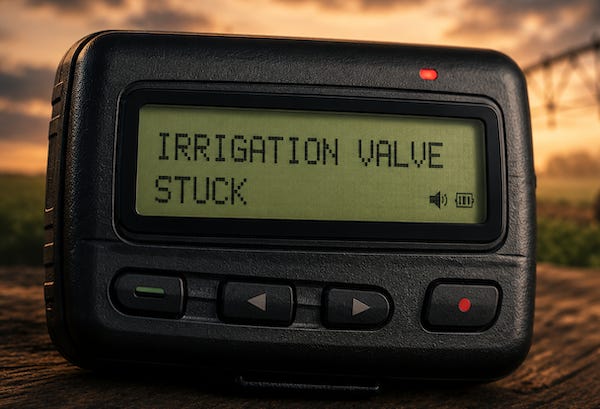
I have spent a lot of time trying to make my farm automation projects reliable. But the unavoidable reality is that, no matter how carefully a system is designed, things will still break from time to time. Hardware stops responding, networks disappear, power goes out, and valves sometimes refuse to cooperate.
Not only do I lack the luxury of watching a dashboard all day waiting for trouble, I have absolutely zero interest in doing so. The systems should be designed to let me know when something is broken.
That is where notification services come in. Years ago, the answer might have been to automate a pager or send an SMS message. Later, smartphones made push notifications the obvious solution.
Push notifications became important because mobile applications could not simply remain awake indefinitely waiting for new information. A notification service provided the path from a remote server to the device and alerted the user when something required attention.
I had experience coding against Apple’s notification service and was familiar with Google’s as well, but I was not about to depend on either company’s permission to operate my farm. My systems should not care what brand of phone I happen to own next year, and building around either company’s notification stack would have recreated exactly the kind of dependency I was trying to leave behind.
What I wanted instead was a reliable, cross-platform notification service with a simple API that could be called from code, shell scripts, monitoring tools, or small services, with support for priorities, sounds, and acknowledgements when needed.
I considered Gotify and ntfy, both capable self-hosted notification platforms with simple APIs and their own delivery infrastructure, but they did more than I needed. I wanted reliable delivery across both Android and iOS without operating another internet-facing service just to send a few alerts.
Behold Pushover
Obviously, I was not the only one looking for a simpler solution. More than a decade ago, software developer and consultant Joshua Stein needed a reliable way for his scripts, servers, and monitoring tools to reach his phone without building an entire notification system himself.
What started as a side project eventually became Pushover. Unlike many technology services that expand into sprawling platforms, it has remained focused on one job: getting a message from a program to a person’s phone.
Pushover is butt-stupid simple to use. Sending a notification is just an HTTPS request containing an application token, a user key, and a message:
POST /1/messages.json HTTP/1.1
Host: api.pushover.net
Content-Type: application/json; charset=utf-8

{
  "token": "YOUR_APPLICATION_TOKEN",
  "user": "YOUR_USER_KEY",
  "title": "Test Message",
  "message": "Something requires your attention",
  "url": "https://example.com/status"
}
A program sends a small JSON document, and a notification appears on the recipient’s phone. The API also supports priorities, custom sounds, images, acknowledgements, and other features, but the basic use case remains simple and straightforward.
The receiving side is just as simple. You install the Pushover client on an Android phone, iPhone, iPad, or desktop browser, sign in, and register the device with your account.
Messages sent to your user key normally appear on all registered devices, although they can also be directed to a specific device.
After a 30-day trial, an individual license costs $4.99 once per platform, with no subscription fee, and that license covers all of your devices on that platform.
That’s it!
How I Use It
I just want to know when something is broken.
I use Pushover to report when a system becomes unreachable, a valve or field device stops responding, AC power fails, a hardware fault appears, or a failed system recovers and begins responding again.
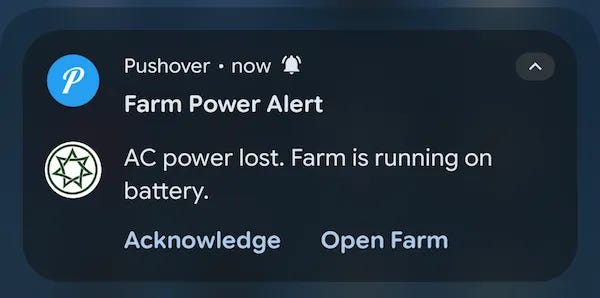
My code detects and records the problem, then sends a POST request to the Pushover API. Pushover delivers the message, so no one has to sit in front of a dashboard waiting for something to fail.
How About Some Privacy?
Pushover does not manage my devices, collect sensor data, or control how my systems operate. It only delivers a message when one of those systems decides that I need to know something.
Pushover can see the notifications it delivers, but they do not need to contain sensitive information. A message can simply report that a problem exists and link to a protected dashboard containing the details. In my case, that dashboard is reached through a Cloudflare Tunnel over HTTPS, which also avoids opening an inbound port on the farm network.
Someone monitoring my Wi-Fi, local network, ISP connection, or the path across the Internet can see that traffic is being exchanged, but cannot read or alter its contents in transit. Cloudflare can technically inspect the traffic because it terminates the HTTPS connection, so the application still needs proper authentication and security.
Why This Still Fits a Self-Hosting Mindset
Self-sufficiency does not require every supporting service to run on hardware you own. What matters is keeping the essential operation and decision-making under your control, while using outside services only as limited, replaceable tools.
My systems still detect problems, record what happened, and decide when to send an alert. If Pushover is unavailable, the farm keeps operating. I simply may not receive the message immediately.
I am not outsourcing the system. I am outsourcing the last mile between the system and my pocket.
That same question of control runs through much of what I write, whether the subject is electronics, software, baking, perfume or motorcycles. The subject may change without warning, but the underlying questions are usually the same: How was this made? Why was it built this way? And who gets to control it?
Hitting like and sharing helps real people find the work. The algorithm can go pound sand.