

Mandatory Ecosystem Rant
If you’ve read my series We Don’t Need No Stinking Ecosystem, then you already know that my decision to move away from Apple was about more than operating systems, phones, or applications. It was about getting out from under institutions that increasingly want their hands on the platforms, services, and infrastructure modern life depends on.
Yeah, and I hate their politics. I don’t trust these technology companies, or the tech bros running them, with the power they now exercise over speech, distribution, identity, and access that should belong to the individual.
The pattern is self-evident from recent history. During COVID, the 2020 election, the unrest surrounding astroturfed movements, and the rise of the woke movement, Facebook, Twitter, Apple, and Google, just to name a few, abandoned any pretense of neutrality. They suppressed reporting, censored dissent, removed applications, and promoted their favored political narratives.
And I see zero evidence that they have changed course. If anything, they have simply found new language and new tools for doing the same thing: ideologically trained AI, effective altruism, and surveillance repackaged as safety with Flock cameras.
It’s the same old story, the same old song and dance, my friend: trust the institutions, trust the science, trust the experts, trust the people in charge.
Only an idiot would.
“It is hard to imagine a more stupid or more dangerous way of making decisions than by putting those decisions in the hands of people who pay no price for being wrong.”
Thomas Sowell (“Wake Up, Parents!”)
The Cloud Was Never the Destination
Weaning myself from Apple started with dropping the iPhone and continued with replacing Apple Mail, Safari, Photos, iTunes, and the rest. Each step loosened its grip, but as long as my data still lived on somebody else’s servers, the job was not finished.
That was the next problem. Trading Apple’s cloud for Google, Dropbox, Spotify, GitHub, or some other provider is not independence. It is only changing landlords.
You may have more choice, but the provider still controls the service, the terms, the price, and ultimately whether you continue to have access at all. The rest of the journey was bringing those services, and the data behind them, under my own roof.
Self-Hosting Isn’t About Saving Money
Bringing those services under my own roof wasn’t just about avoiding subscriptions. By the time you account for hardware, storage, backups, electricity, maintenance, and the value of your own time, self-hosting may not be cheaper at all.
What self-hosting buys me is control. I decide where the data lives, how it is backed up, which software runs, when it is updated, and who can access it. I am not depending on a company to preserve a product, honor an API, maintain a pricing model, or continue tolerating the way I use its service.
Saving money is welcome when it happens, but agency is non-negotiable.
Continuity Matters Too
I also see self-hosting as a form of continuity engineering. A service should not disappear because the Internet is down, an API changes, a company abandons a product, or a provider decides it no longer wants your business. Remote access is useful, but it should be an added convenience, not the foundation on which the entire system depends.
Continuity also means keeping the data in its original form, or at least in a format I can extract and use elsewhere. If the server application fails, the project is abandoned, or something better comes along, I need a clear path out. Replacing one lock-in with another would defeat the whole purpose.
Having completed the mandatory philosophical rant, I’ll get off my soapbox, and let’s get to what you came here for.
The Platform
Before diving into PhotoPrism, Paperless, Forgejo, Jellyfin, Navidrome, Radicale, and the other services I host, it is worth spending a moment on the platform itself.
You don’t need enterprise hardware or a dedicated server room to run your own services. A Raspberry Pi with attached storage lets you experiment with self-hosting without spending much or committing to a larger system. Once you know what you want to run, an Intel NUC or similar mini PC can take you a long way.
I happen to use a Protectli VP3210. It is fanless, compact, quiet, and powerful enough to run the services I need without making a big deal out of it.
Another cool option is the compact mini-rack, like what Jeff Geerling builds.
The hardware itself matters far less than you might imagine. Most self-hosted services need only modest processing power. The real challenge is building a system that keeps working when something goes wrong and does not take your data with it.
Build for Failure
That means planning for failure from the beginning. The server, network equipment, and storage should be protected by a UPS so brief interruptions do not bring everything down and longer outages allow for a clean shutdown.
But surviving a power failure is only part of the job. Important data should also exist in more than one place, with at least one copy stored away from the primary server. RAID, mirrored disks, and snapshots may improve availability, but they are not substitutes for a real backup strategy.
Dependability also requires routine maintenance and a little restraint. Keep the operating system and containers updated, expose as little as possible directly to the Internet, and use secure remote-access tools when outside access is required.
I’m also a big believer in keeping a spare box around that can take over if the primary server fails. Besides shortening recovery time, it gives you a safe place to test a complete restore without disturbing the working system.
And call me paranoid, but I would keep that spare in a fire-resistant, EMP-protected safe, along with a current copy of the data needed to rebuild the system. The supply-chain shortages of recent years taught me not to assume that replacement hardware will always be one overnight shipment away.
Ubuntu and Docker
As for the underlying operating system, I chose a headless server running Ubuntu LTS. It is well supported, widely documented, and designed for long-term stability. The less time I need to log into it and fuss around, the more I like it.
Most of my services run in Docker containers. Docker has become the common deployment model for many self-hosted applications, and for good reason. It simplifies installation, isolates services from one another, makes upgrades relatively painless, and provides a consistent way to manage software regardless of how it was originally packaged.
With the platform out of the way, the more interesting question is what to run on it and why. I did not set out to replace every commercial service simply for the sake of self-hosting. I chose applications where control, continuity, privacy, or long-term access mattered enough to justify taking responsibility for them myself.
What follows is not a list of software recommendations so much as a look at the services I chose, the problem each one solves, and why I decided it was worth bringing that part of my digital life back under my own control.
PhotoPrism: Replacing iCloud Photos
Photos were one of the first things I wanted out of the cloud. Over the years, iCloud Photos had quietly become the permanent home for thousands of pictures and videos, which meant Apple controlled not only where they were stored, but how I accessed, organized, synchronized, and exported them.
Regardless of which replacement you choose, your first step is to get the originals out of iCloud’s stinking paws, preserve the metadata, organize the files, and make a backup somewhere other than the server hosting them. Trust me on this.
Sadly, the process involves more than simply downloading a pile of pictures. You have to deal with duplicates, Live Photos, videos, timestamps, location data, directory structure, and some reliable way of getting new photos off the phone. It’s never easy getting away from the pusherman.
I looked at several photo-hosting options but ultimately chose PhotoPrism. It is open source, does a great job of indexing and cataloging image and video files, and still gives me a modern web interface for browsing, searching, and organizing them. What I really like, however, is that PhotoPrism does not own the library. The photographs remain ordinary files stored in directories I control, while PhotoPrism simply builds a searchable catalog around them.
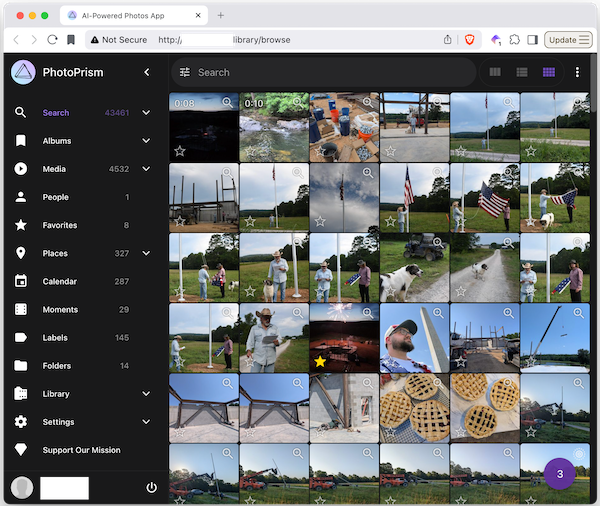
Setting up PhotoPrism was easy. I deployed it as a Docker container alongside MariaDB and pointed it at the directory containing my photo library. Once configured, PhotoPrism indexed the collection, generated thumbnails, extracted metadata, and built its searchable catalog automatically.
If I had written this article last year, I probably would have explained how to build each Docker Compose file step by step. Today, deploying most self-hosted services is almost trivial if you are comfortable with Docker. Any capable AI assistant can generate a workable Compose file in seconds. The important part is not the YAML itself, but understanding where the application stores its data, database, thumbnails, configuration, and backups.
In my setup, the original photographs live in their own directory, while PhotoPrism keeps its thumbnails, search index, cache, and other application data separately. MariaDB has its own storage as well. That separation matters because the originals are the library. Everything else can be rebuilt.
The photos are still just files. I can browse them, copy them, back them up, or move them somewhere else without asking PhotoPrism for permission. The database and thumbnails are useful, but they are not the library.
Once the containers came up, I logged in as the administrator and waited, and waited, while PhotoPrism finished indexing the collection and generating thumbnails. It was worth it because, when it was done, my photos were finally free from Apple’s grasp.
On Android and iPhone, you can use PhotoSync to send new pictures to PhotoPrism. It is not quite as transparent as iCloud on an iPhone and requires a little setup, but once configured it works well.
Contacts and Calendars
I never liked giving Apple access to my contacts and calendars, especially when you consider what those records reveal. A contact list maps your relationships. A calendar records where you have been, where you plan to be, who you meet with, and what matters to you. Together, they provide a remarkably detailed picture of your life.
We have seen all too often how governments, corporations, and self-appointed experts convince themselves that access to such information is justified in the name of safety, public health, security, misinformation, or some other greater good. Once the information is centralized, the temptation to use it always seems to follow.
Getting the data out was easy enough because both contacts and calendars already use open standards. Contacts can be exported as vCard files, calendars as iCalendar files, and most modern applications can synchronize directly through CardDAV and CalDAV.
After looking at the available options, I found Radicale to be the simplest and best fit for what I wanted. It is free, open source, and its developers have zero interest in turning it into the next all-in-one collaboration platform. It is just a CardDAV and CalDAV server, and that’s all.
Radicale has been started as a (free topic) stupid school project replacing another (assigned topic) even more stupid school project.
Radicale does not own the data. Contacts and calendars remain ordinary files stored in standard formats and a simple directory structure. I can inspect them, back them up, copy them, or move them to another server without asking Radicale for permission. The server provides synchronization, but it is not the data.
Like PhotoPrism, I run Radicale in a small Docker container with its configuration mounted read-only and its data stored in a separate directory on the host. The container runs under an ordinary user account rather than as root, and the data directory is included in my normal backup routine.
Radicale listens on port 5232, but I do not treat that as an invitation to expose it directly to the Internet. Remote access should sit behind proper authentication, TLS, and whatever secure proxy or private-network arrangement you use for the rest of your services.
On Android, since I use Fossify Calendar and Android’s Contacts app, I needed a little extra plumbing. DAVx⁵ connects both to Radicale and handles the synchronization in the background. Day to day, I rarely open it unless something needs troubleshooting.
On macOS, no extra plumbing was necessary. I simply added the Radicale accounts to the built-in Contacts and Calendar applications, which already support CardDAV and CalDAV. If you are an iPhone user, the process is much the same. Add the account once, and the built-in Contacts and Calendar applications handle the rest.
Paperless: Replacing the Filing Cabinet
In the past, I used the scanner built into my laser printer to turn important documents into PDFs. These days, phone cameras and scanning apps are good enough that I usually scan them directly to PDF instead. Receipts, warranties, tax records, and other important paperwork ended up in folders on a local file server. That worked well enough until the collection grew large and finding something became an exercise in remembering where I had filed it.
I have been experimenting with self-hosting Paperless-ngx, another community-supported, open-source document management system. It imports PDFs and images, performs optical character recognition (OCR), indexes their contents, and makes them easy to search through a web interface.
Like the other self-hosted applications I use, Paperless builds useful services around the documents rather than taking ownership of them. The PDFs remain mine. Paperless simply makes them easier to organize, search, and find.
One area I find particularly interesting is combining the archive with a self-hosted language model. Projects such as Paperless-AI and paperless-gpt are already flying at nap-of-the-earth level, close enough to use today if you are willing to do a little tinkering. The AI could integrate directly with Paperless or simply index the PDFs themselves.
That would allow me to ask questions such as, “How much did I pay for that well pump?” and have the system locate the receipt and point me directly to the source document.
Jellyfin: Do You Actually Own the Movies You Buy?
In an earlier article, I wrote about movies and television shows disappearing from my Apple TV library after I had supposedly purchased them. The reason might be a licensing agreement, a dispute with a studio, or maybe a decision by someone, somewhere, that it was in my best interest that the content no longer be available. Whatever the explanation, the result was the same: I had paid for something and now I could no longer access it.
A digital purchase tied to somebody else’s store is not really ownership. It is merely permission to watch for as long as they allow it. Apparently, this is what you will own nothing and be happy looks like in practice.
So screw them. I started buying discs, often second-hand, converting them into ordinary video files, and storing them on my own NAS. It requires more effort than clicking Buy, but in the end the files are mine and the library cannot be altered by some third-party asshole.
Today the common practice is to rip commercial discs to MKV using MakeMKV and then transcode the resulting files with HandBrake. This produces clean, unprotected video files suitable for efficient storage and streaming while keeping the transcoding work inside the tool most people already know and trust.
Once the files were ready, I stored the video library on its own disk drive and ran Jellyfin in a Docker container to serve it up. Another option is to store the files on a NAS and point Jellyfin to the library there.
Jellyfin is a free, open-source media server designed to organize and stream personal collections of movies, television shows, music, and other media. Think of it as your own private version of Netflix, except the content is stored on hardware you control rather than somebody else’s servers.
Jellyfin catalogs movies and television shows, downloads artwork and metadata, and tracks viewing progress. To watch something, I open the Jellyfin app on a television, streaming box, phone, tablet, or computer. The experience is much like using a commercial streaming service: browse the library, choose a title, and press Play. Clients are available for most major platforms.
Like most of the services discussed here, Jellyfin does not require particularly powerful hardware. If your clients can play the stored media directly, even modest systems work well. Where this starts to break down is with on-the-fly transcoding or multiple simultaneous users. For that, you’re gonna need a bigger boat.
Navidrome: Play That Funky Music
Music has many of the same ownership problems as movies and television. Streaming services are convenient, but access ultimately depends on licensing agreements, subscriptions, and the whims of whoever happens to control the platform.
Just like my movie collection, I solved the problem the old-fashioned way. I ripped my music CDs to disk and stored the files on my server.
To host and stream those files, I use Navidrome. And guess what, Navidrome runs in a Docker container too and simply points at a directory containing the music library. It is a free, open-source music server designed around simplicity rather than becoming an all-in-one media platform.
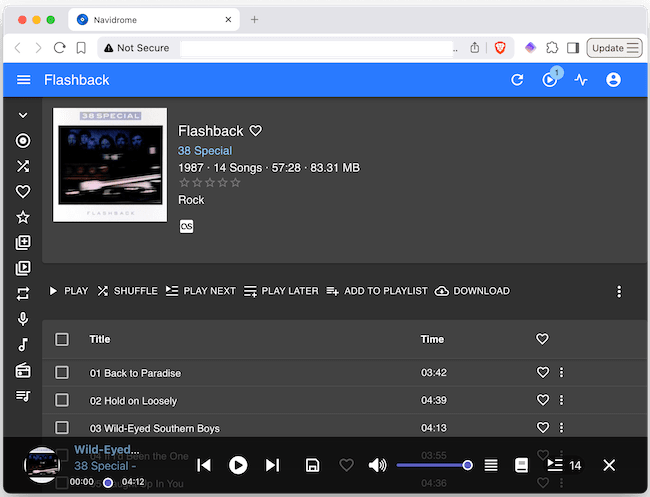
Navidrome catalogs the library, downloads artwork and metadata, builds playlists, and makes the collection available through a web interface. It also supports the Subsonic protocol, which means there are numerous compatible clients available for phones, tablets, desktop computers, and even car audio systems.
Like Jellyfin, Navidrome does not own the music. The files remain ordinary files stored in ordinary directories. I can copy them, back them up, move them to another server, or replace Navidrome entirely without affecting the collection.
Navidrome provides the service. The music library is the dish.
Forgejo: Your Work Has Value Too
Most people think of photos, documents, music, and movies as personal data. As a software developer, I would add source code to that list.
Years of work can be wrapped up in a repository. Even if the code itself has no commercial value, it often represents thousands of hours of learning, experimentation, and problem solving.
For years I used GitHub, and I still use it as my primary platform for sharing public projects. It has its place. But like every other hosted platform, it comes with baggage. Content moderation disputes, shifting policies, and the general trend toward centralization all serve as reminders that GitHub is ultimately Microsoft’s house.
The AI question makes that especially clear: if I publish code on GitHub, should Microsoft be allowed to train on it and generate similar code without giving credit or attribution?
To host my own repositories, I run yet another Docker container, this one running Forgejo. Forgejo manages Git repositories, issues, pull requests, and projects through a browser-based interface not unlike GitHub.
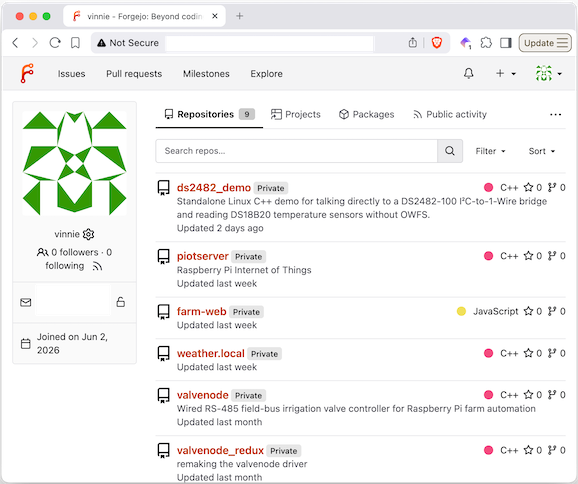
Because Git was designed as a distributed version control system, every repository is already self-contained and portable. Forgejo does not own the repositories. I can back them up, mirror them elsewhere, move them to another server, or replace Forgejo entirely without affecting the source code.
Taking Back Your Digital Life
Self-hosting is not effortless. You have to do the work. The reward is owning a little more of your digital life. But at the end of the day, the data is under your control. It lives in open, portable formats, and even if a developer walks away tomorrow, your server keeps running. And chances are, somebody else will step in and pick up the slack.
That question of who gets to decide runs through much of what I write, whether the subject is electronics, software, baking, perfume or motorcycles. The subject may change without warning, but the underlying questions are usually the same: How was this made? Why was it built this way? And who gets to control it?
Hitting like and sharing helps real people find the work. The algorithm can go pound sand.
I absolutely love this. I am fairly good with computers and technology; however, this is way over my head. Since moving to Maine, I have wanted to create an "intranet" for the property. That may not be the correct terminology. Basically, a wireless and wired network on which I could store and access documents and files. Access would be via tablets, laptops, and possibly televisions to stream videos.
Point well taken on movies. Back in the 2000s, I used to copy DVDs onto other DVDs. Now I have digital copies, and I use the Playon app. It does cost around .12 cents per recording, and yes, there is a digital footprint, but it is very efficient. I have considered buying DVDs again. Just picked up a DVD player.
I'm rambling. Appreciate your content here. Great stuff.