

So the other day, the little squirrel in my head says to me, “Vinnie, you write all this stuff about self-hosting, and yet you publish on Substack. Aren’t you worried you might lose your content if they stop liking you or go tits up?” The little guy’s got a point there.
Yes, you can ask Substack to export your stuff. What you get is a ZIP file with text of every article as HTML and metadata such as titles, dates, status, subscriber data, and delivery/open statistics. The images themselves are not included, only the links to where Substack hosts them.
Bottom line, it’s not standalone, it’s not really portable to other platforms, and you’re still dependent on Substack. Why should it be? They have zero incentive to give you an easy exit plan.
Now don’t get me wrong, I have no beef with Substack, I coexist with their platform just fine. So far they have been fairly neutral, well, in comparison to the rest of the social media platforms.
But that could change. Even if it didn’t, I still want possession and control of my content.
What would be ideal
In a perfect world, the export would be complete and self-contained, with no dependency on external sites. It would be easy to edit, compatible with source control like git, and not be a bear to move somewhere else.
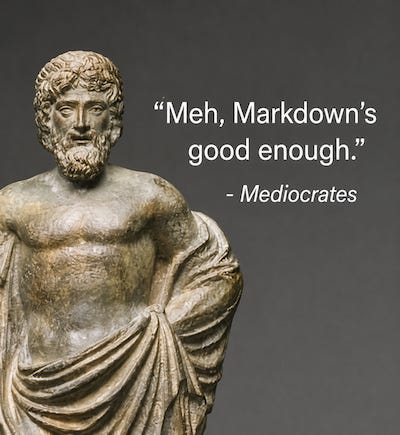
That pretty much leaves Markdown. I am not in love with it. It’s the Mediocrates of document formats, but it works, and just about everybody supports it.
So I Asks AI...
I really didn’t want to spend a lot of time on this. I got other stuff to work on, but I realized I had invested a bit of time in my Substack articles and was starting to feel like a schmuck for not keeping a local copy.
So keeping with all the cool kiddies, I decided to let AI do the heavy work this time. I explained in excruciating detail to GPT what I wanted, and after a few hours of push and pull, what I got was a nice command-line tool to convert the export ZIP into something more useful. It didn’t do a bad job really.
The article Command-Line Tool
I present you article, a Linux command-line tool written in C++ for building and maintaining a self-hosted publishing archive. It can import a Substack export ZIP or a locally written Markdown file, download the external images, convert the articles into a local Markdown archive, and build a complete static HTML website that you can serve with nginx or just about any other web server.
To be specific, the Markdown files and images are the real archive. You can delete the web files and rebuild it whenever you want.
The article command-line tool is written in C++23. I build it with clang++, although there’s nothing particularly Clang-specific about the code, so it should build with a modern g++ as well.
I’m not going to duplicate the build instructions here. The README covers the required libraries, build commands, installation, and basic usage.
Getting Your Export from Substack
From your Substack Dashboard, go to Settings, then scroll all the way down until you get to Import / Export.
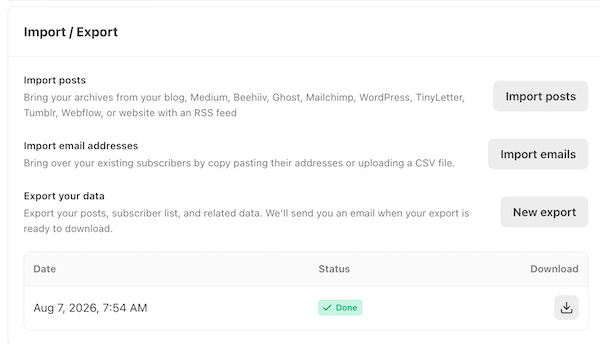
Under Export your data, select New export. Substack will prepare the export and email you when it is ready. Go back to Import / Export and download it.
You will get a ZIP file with a generated name something like:
-HhoYdyNS2ig6uvqsff4Kg.zipThat’s your Substack export. I usually rename it to something a little more useful, such as:
substack-export-2026-08-10.zipDon’t unzip it. article reads the Substack export ZIP directly.
Importing Your Substack Archive
Once you have the ZIP file, put it in your publication directory and run:
article import substack substack-export-2026-08-10.ziparticle reads posts.csv, finds the exported HTML for each post, converts the article body to Markdown, downloads the images, and stores everything in the local archive.
Then check the archive:
article verifyAnd build the static site:
article build --cleanThe generated HTML website ends up under:
archive/site/The unpacked and converted Markdown files and the images can be found here:
archive/content/
archive/assets/
Those are the Markdown files and local images. The website is just generated output and can be deleted and rebuilt whenever you want.
Templates and Configuration
Before you build the site, there are four files you might want to customize:
templates/article.html controls the layout of individual article pages.
templates/index.html controls the front page.
static/article.css controls the styling.
article.conf configures the publication and tells the article tool where the archive, templates, and static files are located.
If you change any of the templates or the CSS, just rebuild:
article build --cleanNo need to re-import anything. The Markdown archive stays exactly as it is.
Self-Hosting Your Content
As I described in Taking Back the Infrastructure, I run my self-hosted services on a headless server running Ubuntu LTS, mostly in Docker containers. I did the same thing here.
My GitHub repository includes a sample docker-compose.yml file that starts an nginx web server and serves the generated site:
services:
  web:
    image: nginx:1.27-alpine
    container_name: article-web
    restart: unless-stopped
    ports:
      - "9010:80"
    volumes:
      - ./archive/site:/usr/share/nginx/html:ro
      - ./nginx/default.conf:/etc/nginx/conf.d/default.conf:ro
Feel free to change the port 9010 if you want to use a different one, then bring the container up. At that point you should be able to point a browser at the server and see the site index.
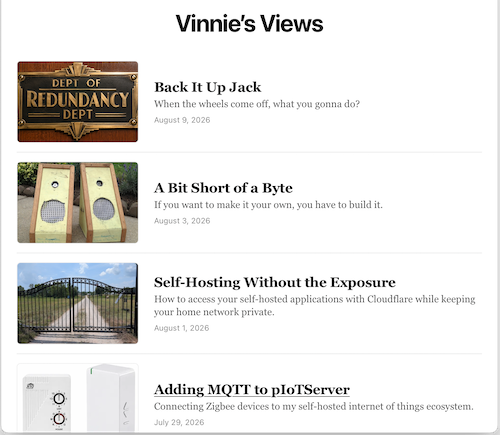
The generated site is mounted read-only. If anything goes wrong, you can delete the container and bring it right back up.
If you want to make the site available outside your LAN, you can set up a Cloudflare Tunnel by following the instructions I wrote in Self-Hosting Without the Exposure.
Taking Back One More Piece
Don’t get me wrong, I’m not quitting Substack. It doesn’t do a bad job of publishing and distributing what I write and they haven’t burned me, yet. But at least I have some leverage now, and I don’t have to trust it with the only copy of my work anymore.
I now have a local copy of the article I write and the images and links, in a format I can read, back up, move, and rebuild somewhere else if I need to.
So, one dependency on the tech bros gone, and one more piece back under my control.
If you are like me, and feel that you want more control of your digital life, then you probably will like some of the other stuff I write. Whether the subject is electronics, software, baking, perfume, or motorcycles.
Who knows what I will write about next, but the underlying questions are usually the same: How was this made? Why was it built this way? And who gets to control it?
Hitting like and sharing helps real people find the work. The algorithm can go pound sand.
I've been following your posts for a while and have enjoyed reading about all your efforts to disentangle from "the algorithm". I just recently went through a very similar soft exit from substack and moved the bulk of my HTH content over to a static site backed by markdown and hosted on gitlab pages. I have really enjoyed the added flexibility of being able to customize the site beyond what substack supports. Like you said, I think substack is probably great for distribution so I also plan to stick around for a while, but have changed my strategy to treat it more like one of many inbound channels rather than the primary content store.
Thanks for sharing the writeup! Happy to see I'm not the only one that is thinking this way.