

“When you are up to your ass in alligators, it is difficult to remind yourself that your initial objective was to drain the swamp.”
If you are like me, you rather be making stuff than fixing stuff. But it’s unavoidable. Stuff’s gonna break, and you got to fix it. Out here on the ranch, the things seem to always break at the worst time. I’d like to share a few tips that work for me to get things running pronto so I can get back to doing what I like. Some of them might sound like Captain Obvious, but trust me, they weren’t obvious to me at the time.
Data Backups
Well duh. Everybody knows they’re supposed to back up their data. But what does that actually look like for an embedded irrigation system or a weather station?
Start with the stuff you can’t just reinstall: the files you customized during setup, your configuration, and whatever operational history the system has collected.
The code that runs my irrigation system, pIoTServer, can be easily rebuilt and installed on another Raspberry Pi. But the configuration file farm.props.json is specific to my installation. And the data recorded in the piotserver.db SQLite database has been collected for years.
My weather station is no different. The configuration is easy enough to recreate, but weather_history_v2.sqlite3 is my historical weather database, and it holds years of measurements I wouldn’t be able to recreate.
Backing Up the Irrigation History
Since this runs on Linux, I already have everything I need: ssh and rsync. I don’t need any backup package or special software. Just copy the database to another machine. That is about as KISS as it gets. The tools are already there, they work, they’re free, and I know exactly what they are doing. If I need to recover the database, I copy it back.
rsync is perfect here because it only moves what changed. After the first full copy, later backups are usually small and quick. That matters when the database gets backed up on a regular schedule. It has been around forever, it works, and there is not much to screw up.
A Consistent Snapshot
My first instinct was to copy the SQLite database while pIoTServer was running. That might work most of the time, but if the copy catches SQLite in the middle of a transaction, I could end up with an incomplete or corrupt backup.
Instead, let SQLite create the backup, then write the snapshot to a RAM disk (/dev/shm) to avoid an unnecessary write to the Raspberry Pi’s SD card.
The backup process goes like this:
Have SQLite create a clean snapshot on the irrigation server:
ssh -i ~/.ssh/backup-key user@node \
  "sqlite3 \"\$HOME/piotserver/piotserver.db\" \
  \".backup '/dev/shm/piotserver-backup.db'\""
Copy the snapshot to the backup server with rsync:
rsync -a -e "ssh -i ~/.ssh/backup-key" \
  user@node:/dev/shm/piotserver-backup.db \
  latest.db
Check the copied database with SQLite’s PRAGMA integrity_check:
sqlite3 latest.db "PRAGMA integrity_check;"Delete the temporary snapshot from the irrigation server:
ssh -i ~/.ssh/backup-key user@node \
  "rm -f /dev/shm/piotserver-backup.db"
The real script also adds error checking, timestamped filenames, rotation, and cleanup.
A Few Words About SSH
You’ll notice the examples above use a dedicated backup-key. Since these backups run unattended every night, nobody is sitting there waiting to type a password. SSH takes care of that with public-key authentication.
I created a key pair just for backups. The private key stays on the backup server, and the public key goes in the irrigation server’s authorized_keys file.
Once that is set up, the backup server can run commands with ssh and move files with rsync. And we avoid exposing the password in a script.
I have a separate backup SSH key, rather than using my normal login key. That way, if I ever need to kill it and make another one, I can do that without touching my login access. That key is still a login credential, so keep the private key protected; don’t copy it around unnecessarily.
Before I move on, I want to mention that SSH also allows you to limit the key to the backup server’s IP address, disable interactive logins and forwarding, or even restrict it to only the commands the backup needs.
Cold Spares
In a perfect world, all you’d ever have to restore is a data file. But sometimes the hardware itself is what dies. When that happens, the quickest way back up may be to swap in a preconfigured clone instead of rebuilding the whole system from scratch.
After doing this a couple of times, I found it was best to make that clone just before I deploy the real system. Everything is already configured, tested, and still fresh in my mind. Making a second copy only takes a few minutes.
Six months later, after Lord knows how many other projects I’ve worked on, recreating that environment from memory becomes an exercise in archaeology. At least it does around my shop.
Single-Purpose Controllers
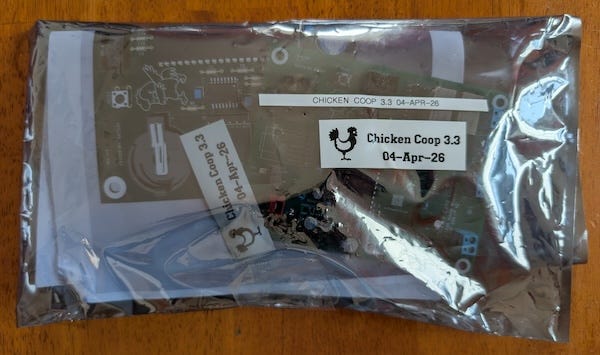
What about single-purpose systems like my chicken coop controller? I keep a fully configured spare, or two, on the shelf. Ready to go with the operating system, latest software and firmware, and any daughter cards it would use. I label it with the firmware version and the date, then seal it in an anti-static bag.
That way, if the controller fails, I won’t have to run around the shops scrounging parts or sit in front of a scope trying to repair or build a replacement with my farm system dead. All I have to do is grab a bag off the shelf and replace the dead unit. At worst, if the firmware changed, just flash the latest version before replacing it.
More Complex Systems
The same idea works for more complex systems like the irrigation controller. I still build complete, working, tested spares, but more things can go wrong. These boards have operating systems, applications, configuration files, databases, and network settings that all have to be preserved.
Sometimes swapping the whole unit is the fastest way back up. Other times it makes more sense to replace just the Raspberry Pi or the irrigation valve board. I built them as daughter cards for exactly this reason, so I can leave the wiring and sensors in place and only swap the part that died.
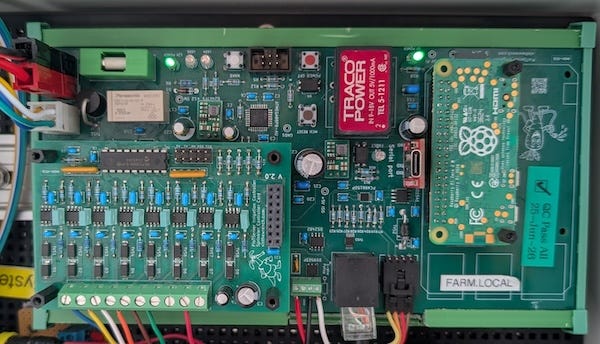
Another design choice that saved my ass more than once is the addition of a connector for a serial console adapter.
If you look at the irrigation server or the chicken coop board you’ll see a 6-pin connector. I designed it so I can plug in a CH340C/USB-C card and talk to the board from a laptop. After standing in the chicken coop with a laptop once, I’m thinking of switching it to a Bluetooth serial link so I can stay outside.
The one time the Pi’s Qualcomm Wi-Fi chip failed, I hooked up to the serial console and figured out what happened. It worked, but standing in the field troubleshooting in the heat, cold, or rain is not my idea of a good time. I’d rather swap the failed hardware, get the system running again, and dig into the old unit later in the shop
The Network Identity Problem
One more thing. When you swap a board that talks to the network, the MAC address almost always changes. If the IP is not locked down, the new board can come up at a different address. Then every service, proxy, or tunnel that was pointing at the old IP stops working until you track it down and fix it.
That’s why these machines need fixed addresses. They’re not laptops that move around. An irrigation controller, MQTT broker, weather station, or home automation server should always come up at the same IP.
Most routers use DHCP and hand out addresses based on the MAC. A DHCP reservation can keep the IP the same, but it’s still tied to the old MAC. When you swap in a spare board, you’ll have to update the reservation too.
Things get messier once a web front end is involved. farm-web sits behind Docker, nginx, reverse proxies, and a Cloudflare tunnel. That’s why I just set a static address on the board instead of trying to be a smart ass.
Home Automation and Zigbee
Now that the farm systems are mostly stable, I’ve started paying more attention to home automation.
Home automation brings its own backup problems. The server can be perfectly healthy, but all the Zigbee devices still depend on a coordinator to talk to the server. If that coordinator dies, the lights, switches, plugs, and sensors pretty much disappear with it.
Zigbee coordinators generally come in two flavors: a USB dongle plugged into the server, or a standalone box that talks over Ethernet.
I use the Ethernet kind, an SMLIGHT SLZB-06P7U. I like it because the radio and the computer can be physically separate.
If the Pi running the server dies, I can drop in a cloned spare and leave the coordinator alone. As long as the new Pi has the right configuration and the right Zigbee2MQTT database, everything comes back.
The other nice thing is that I can put the server somewhere safe and convenient, and put the coordinator wherever the radio coverage is best.
If I have to replace the SLZB-06P7U coordinator, I run into the same network identity problem I talked about earlier. The replacement has a different MAC address, so I also give the coordinator a static IP.
What did we learn?
Most of this I learned the hard way.
Things break at the worst possible time, and usually not one at a time.
Back up the stuff you can’t recreate. I can reinstall code. Reinstalling years of data, not so much
Keep a cold spare around. Swapping in a board that already works beats rebuilding one while everything is dead.
Give the important network devices fixed addresses. he last thing I need during a failure is to fight with the router over IP addresses.
Build in a serial console. When the network is dead, I still want a way into the machine. Ask me how I know.
Do the work while everything is still running. Alligators, baby! Alligators!
If my point about the alligators hit home, you’ll probably enjoy much of what I write about, whether the subject is electronics, software, baking, perfume, or motorcycles. The subject changes without warning, but the questions never do: How does it work? Why was it built that way? And can I build, fix, or control it myself?
Hitting like and sharing helps real people find the work. The algorithm can go pound sand